WhatsApp now lets people set a username — a handle like
@yourname they can share instead of their phone number. It's a small change with a real consequence for any business that talks to customers on WhatsApp: someone can now message you, ask a question, or register for an event without you ever seeing their number. This guide explains what usernames are, what actually changes when a customer uses one, and exactly how Exabloom handles it behind the scenes so your conversations keep working.1. What Is a WhatsApp Username?
A WhatsApp username is an optional handle, similar to a username on Instagram or Telegram. Once someone sets one, they can be reached — and can reach out — using
@theirhandle instead of a phone number.This is a user-side feature. It's controlled entirely by the person messaging you, not by your business. From your side there's nothing to switch on. The only thing you need to know is what it means when a customer chooses to use it.
The key point: A phone number is no longer guaranteed. A customer can start a full conversation with your business while their number stays private — and that's by design on WhatsApp's part.
2. What Actually Changes for You
For the most part, nothing about the day-to-day changes. Messages send and receive exactly as before. Three things are worth understanding:
| What | Before usernames | With usernames |
|---|---|---|
| Starting a conversation | Customer's number is always visible | Customer can message with no number shown |
| How the contact is identified | By phone number | By a private WhatsApp identifier (see below) |
| Replies, workflows, automations | Work as normal | Work exactly the same |
The conversation itself doesn't change. What changes is how the contact is identified — and Exabloom takes care of that for you.
3. How Exabloom Identifies a Username-Only Contact
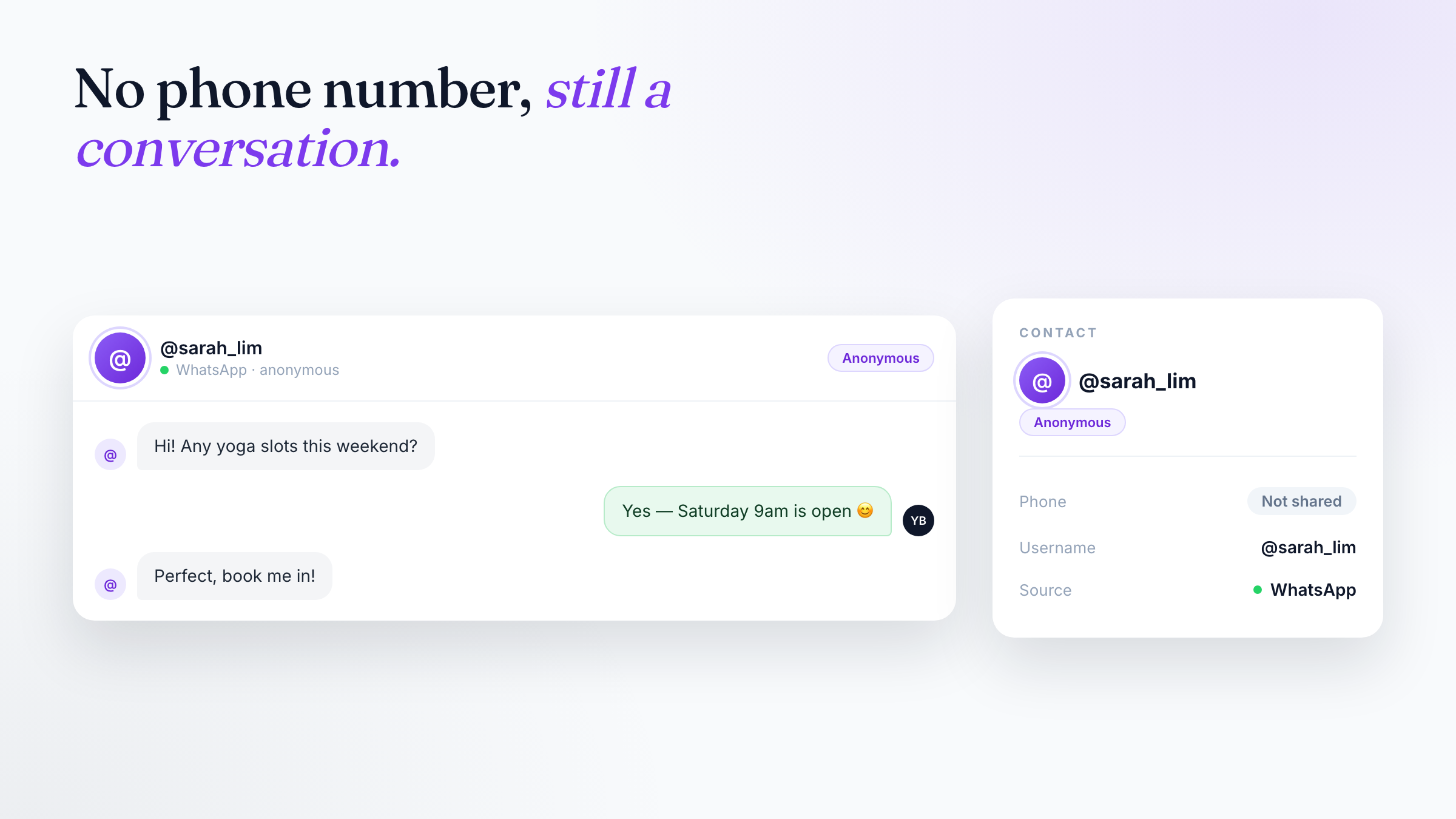
When someone messages you without sharing a phone number, WhatsApp still sends Exabloom a private, business-scoped identifier for that person (WhatsApp calls it a Business-Scoped User ID, or BSUID). Exabloom uses it to create a proper contact and keep the conversation going — even though there's no number attached yet.
Here's what you'll see:
- A contact is created automatically, just like any other lead.
- On the contact, the phone field reads "Not shared," and where available their handle shows as
@theirusername. - In the inbox, the conversation is labelled "WhatsApp · anonymous" so your team knows at a glance that no number has been shared.
- Replies, tags, assignments, workflows, and automations all keep working. Nothing is blocked by the missing number.
In plain terms: A username-only customer becomes a normal contact you can talk to, tag, assign, and automate — the phone number is simply blank until (and unless) they choose to share it.
4. When a Number Is Revealed Later
At some point a username-only customer may share their phone number — for example, by tapping to send it, or through the request described in the next section. When that happens, Exabloom does one of two things, depending on whether the number is new to you.
If the number is new
If the revealed number doesn't match anyone in your contacts, Exabloom simply attaches it to the same contact you've already been talking to. Nothing to review, nothing to click — the contact now just has a phone number too.
If the number matches an existing contact
If the revealed number already belongs to another contact in your account, Exabloom does not merge anything on its own. Instead, it raises a review so a human decides:
- You get a "Possible duplicate — review needed" prompt showing both contacts side by side.
- Choose Merge and future WhatsApp messages route to the confirmed contact. The original conversation stays exactly where it is — messages never move between contacts once they've been sent.
- Choose Not the same person and both contacts stay separate.
Either way, nothing is deleted, and if you merge two contacts by mistake, you can undo the merge for up to 30 days afterward.
Why messages don't move: Merging in Exabloom re-points future messages to the contact you confirm — it never rewrites the history of past conversations. That means a merge can always be reversed cleanly, and you never lose the thread of what was actually said.
5. Asking a Customer for Their Number Directly
You don't have to wait for a customer to volunteer their number. If your business has an approved WhatsApp template with a "Share Contact Info" button, your team can send a Request phone number message to any username-only contact in one click.
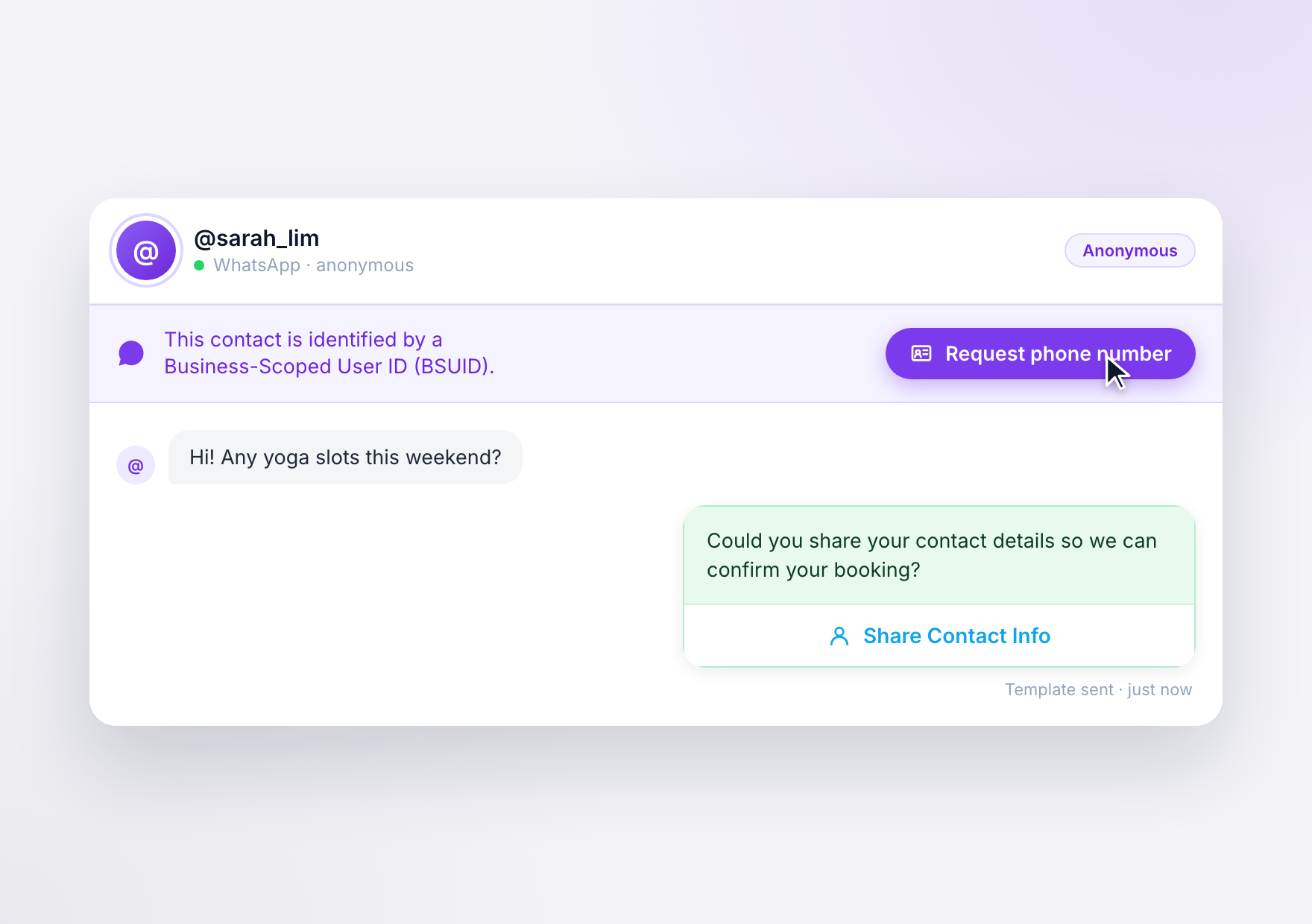
- On a username-only conversation, a banner appears with a "Request phone number" button.
- Clicking it sends the approved template to the customer.
- The customer shares their number back with a single tap — no typing needed on either side.
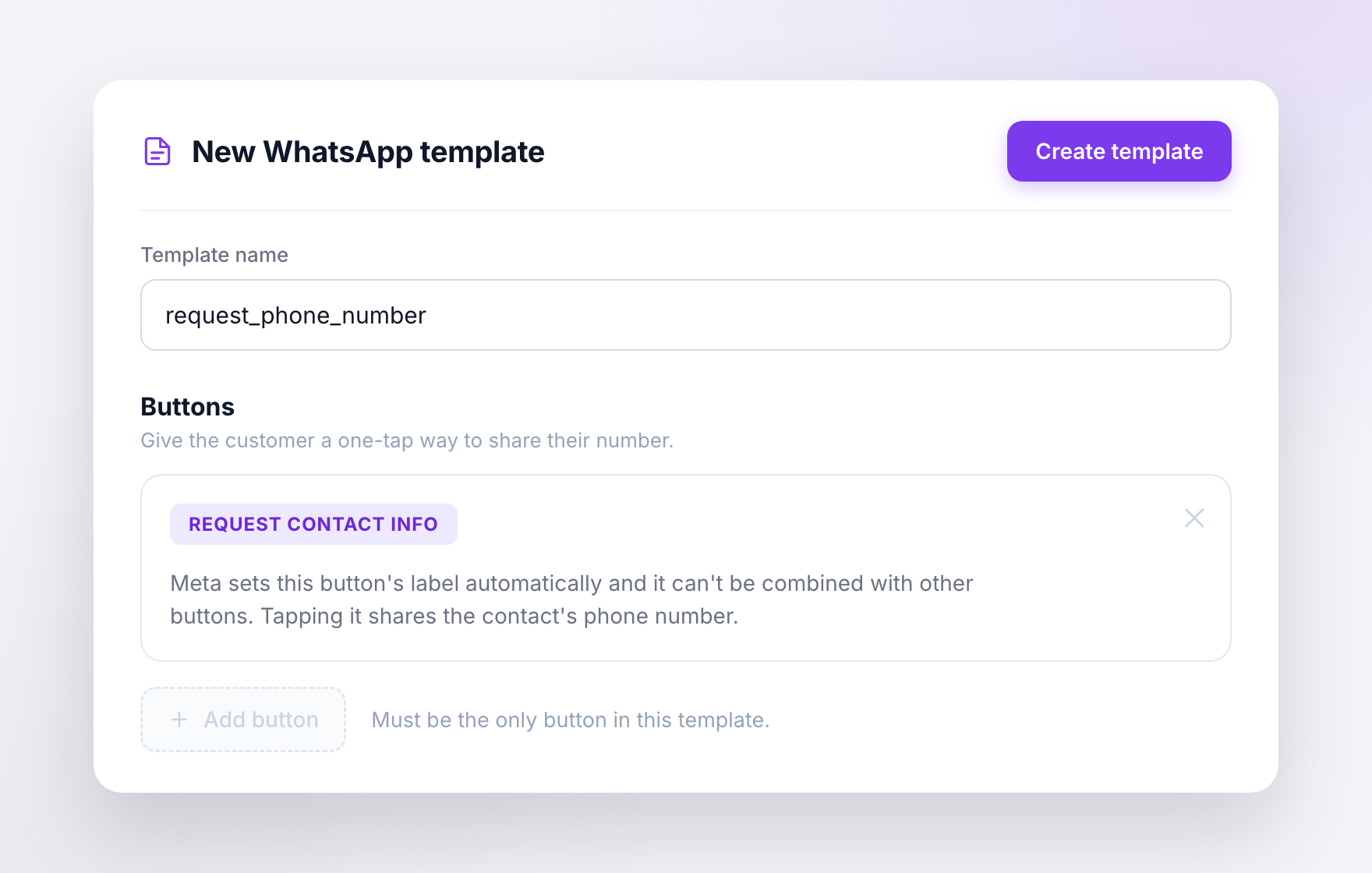
One-time setup: The "Request phone number" button only appears once you've created and had WhatsApp approve a template that contains the "Request Contact Info" button. A few WhatsApp rules apply: the button's label and behaviour are set by WhatsApp (not customisable), and it must be the only button in that template — it can't be combined with other buttons. Set the template up once and the option is there for every username-only contact from then on.
6. Why This Matters
- Easier first contact. People can reach you from a bio link, QR code, or ad without saving a number or handing theirs over first. Lower friction means more conversations started.
- Privacy-conscious customers engage at all. Some people simply won't message a business that demands a phone number up front. Usernames let them start the conversation on their terms — and you can always ask for the number later, once there's trust.
- No lost leads. Because Exabloom creates a real contact and keeps the thread going from the first message, a username-only enquiry is never dropped just because there's no number attached.
7. Frequently Asked Questions
Do usernames replace phone numbers?
No. A username is an additional way for people to reach you without sharing a number. Customers who message you by phone number as usual are unaffected.
Do I need to turn anything on?
No. Usernames are controlled by the person messaging you. Exabloom handles username-only contacts automatically — there's nothing to enable.
Will I lose a conversation's history if the customer's identity changes later?
No. When a number is revealed and contacts are merged, new messages go to the confirmed contact while the original conversation stays exactly where it was. Messages never move between contacts once sent.
What if Exabloom links the wrong contacts?
It won't do it silently — a match against an existing contact always goes to you for review, side by side. And if you accept a merge by mistake, you can undo it for up to 30 days.
Can I get a customer's number without waiting for them to offer it?
Yes. If you have an approved WhatsApp template with a "Share Contact Info" button, use the Request phone number button on the conversation. The customer shares their number back with one tap.
Does this affect outbound messages my business sends?
No. This only affects how inbound, username-only contacts are identified. Everything you send works as before.
8. Quick Reference
| What to remember | The rule |
|---|---|
| Usernames are a customer choice | Nothing for you to enable |
| Username-only contact | Created automatically; phone shows "Not shared", handle shows as @username, inbox label "WhatsApp · anonymous" |
| Everything still works | Replies, tags, assignments, workflows, automations all function normally |
| New number revealed | Attached to the same contact automatically |
| Revealed number matches an existing contact | You get a side-by-side review — nothing merges silently |
| After a merge | Future messages route to the confirmed contact; past messages never move |
| Made a mistake | Undo a merge for up to 30 days |
| Need the number sooner | Use Request phone number (requires an approved "Share Contact Info" template) |
| Outbound messages | Unaffected |